
Close the loop on every finding. Our Corrective Action Software turns audit nonconformities, incidents, and inspection findings into investigations, verified actions, and documented effectiveness reviews.
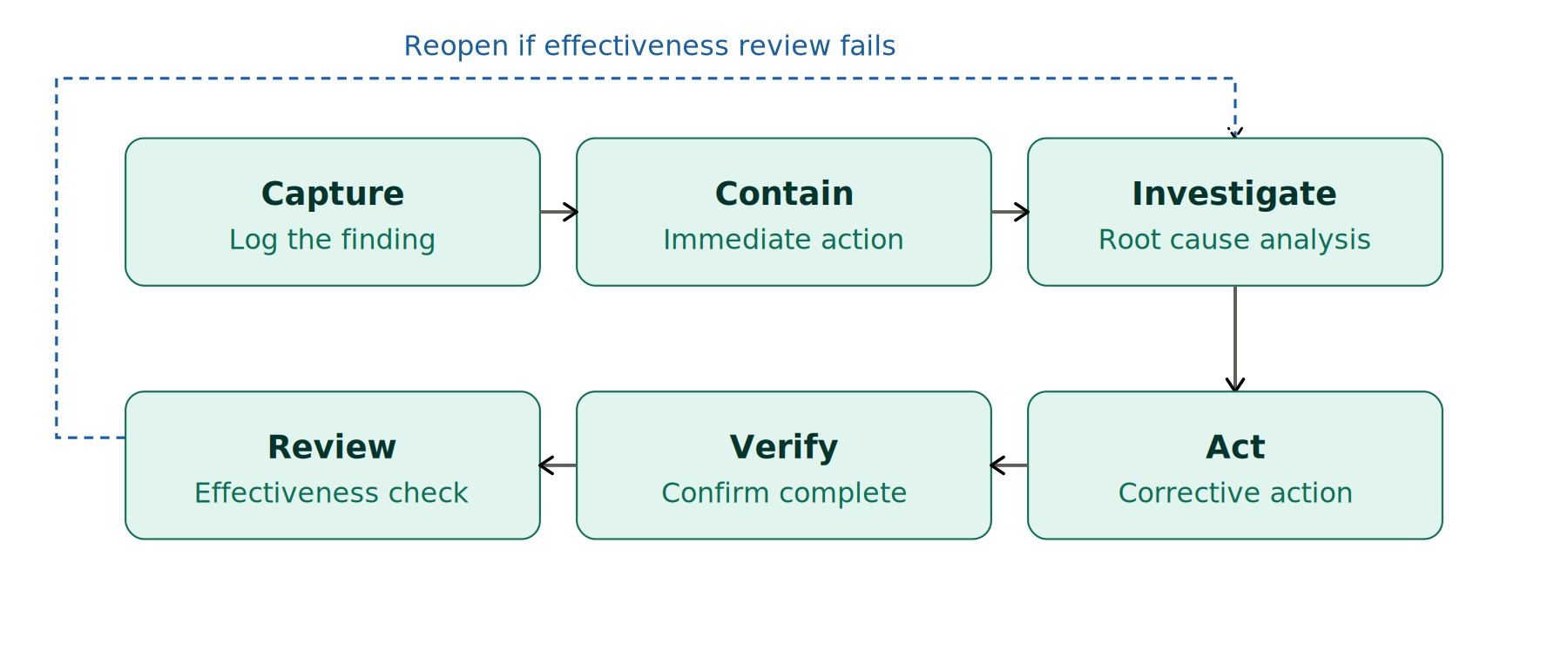
- Closed-Loop CAPA Workflow Containment, root cause, corrective action, verification, and effectiveness review in a single record.
- Root Cause Built-In 5 Whys, fishbone, fault tree, and 8D methodologies attached directly to the nonconformance.
- Audit-Ready Evidence Trail Every finding, decision, action, and verification preserved for ISO 9001, 14001, and 45001 audits.
Corrective Action Software vs. Task Tracking
Our Task Management Software is built for day-to-day work assignments, recurring compliance obligations, and project tasks. Corrective Action Software is purpose-built for the closed-loop CAPA process that begins with a finding or nonconformance and ends with a documented effectiveness review. Most customers run both: corrective actions flow into task lists for assigned execution, while the CAPA record itself preserves the investigation, root cause, and verification trail auditors expect.
Why Closed-Loop CAPA Software Matters
Resolve Findings, Don’t Just Track Them – Move beyond a list of open action items to a structured workflow that drives every nonconformance to a documented root cause, verified action, and effectiveness review.
Audit-Ready by Design – Capture the nonconformity description, immediate containment, root cause analysis, corrective action, verification, and effectiveness review in one record. ISO 9001, ISO 14001, ISO 45001, and regulatory inspectors get the full evidence trail without scrambling.
Prevent Recurrence, Not Just Symptoms – Built-in 5 Whys, fishbone, fault tree, and 8D tools force the team past the symptom and into the systemic cause, so the same finding doesn’t come back next audit cycle.
Connect Findings to Their Source – Every CAPA links back to the originating audit, inspection, or incident, so investigators have the full context and reviewers can trust the disposition.
Eliminate the CAPA Backlog – Stage gates, owners, due dates, and automated escalations expose stalled investigations before they become audit findings of their own.
Verify Effectiveness, Not Just Closure – Scheduled effectiveness reviews 30, 60, or 90 days after closure confirm the action actually solved the problem — the part most CAPA programs skip.
Distinguish Corrective from Preventive – Corrective actions resolve existing nonconformities; preventive actions address risks before they materialize. Each is tracked on its own timeline with appropriate verification.
Tie Actions to Downstream Changes – A corrective action often requires updating an SOP, retraining staff, or running a management of change. The CAPA record links to those downstream artifacts so nothing gets lost.
Mobile-First Field Capture – Capture nonconformities, photos, and immediate containment from the line, the lab, or the loading dock with our mobile app, online or offline.
Trend the Right Things – Aggregate root cause categories across CAPAs to spot systemic weaknesses in process, equipment, training, or supervision — the leading indicators that drive program-level improvement.
Cost Effective – Our compliance software is more affordable than you might think; contact us to learn more!
Corrective Action & CAPA Software Features
Closed-Loop CAPA Workflow
Nonconformance Capture – Record findings with severity, scope, affected products or processes, immediate impact, and supporting evidence (photos, documents, witness statements).
Source Linkage – Open a CAPA directly from an inspection finding, incident report, internal audit, supplier nonconformance, customer complaint, or regulatory citation, with full traceability back to the originating record.
Containment Actions – Document the immediate steps taken to control the issue and prevent further impact while the investigation proceeds.
Root Cause Analysis Tools – Built-in 5 Whys ladders, Ishikawa fishbone diagrams, fault tree templates, and 8D problem solving worksheets attach directly to the CAPA record.
Corrective & Preventive Action Plans – Separate fields and timelines for corrective actions (eliminating the cause of an existing nonconformity) and preventive actions (addressing potential nonconformities before they occur).
Action Verification – Independent reviewer confirmation that each action was completed as planned, with evidence requirements configurable by action type.
Effectiveness Review Scheduling – Automatic scheduling of effectiveness checks at configurable intervals after closure (commonly 30, 60, or 90 days) to confirm the action actually prevented recurrence.
Stage Gate Approvals – Configurable approval workflows at each stage so investigations cannot advance without the right sign-offs.
Owner Assignment & Notifications – Each CAPA and each action has a named owner with automated email and mobile reminders as deadlines approach or pass.
Document & Training Linkage – Tie corrective actions to document updates, training reassignments, and management of change records so downstream impacts are not lost.
Risk Re-Evaluation – ISO 9001, 14001, and 45001 require re-evaluating risks and opportunities after a nonconformity. The software prompts and captures this re-evaluation in the CAPA record.
Trend Analysis & Dashboards – Aggregate root cause categories, source types, and effectiveness rates across sites and time periods to identify systemic weaknesses and program-level improvement opportunities.
Reopen & Escalation – If an effectiveness review fails or the issue recurs, the CAPA can be reopened, escalated, and re-investigated without losing the original record.
Mobile Capture – Field users capture nonconformities, attach photos, and record immediate containment from iOS, Android, or Windows tablets, online or offline.
ISO-Aligned Reporting – Pre-built reports for ISO 9001 Clause 10.2, ISO 14001 Clause 10.2, and ISO 45001 Clause 10.2 produce the documented information certification auditors expect.
Configurable Workflows – Tailor stage names, required fields, approval routes, and effectiveness intervals to match your management system, industry, and risk profile.
Frequently Asked Questions About Corrective Action Software
What is corrective action software?
Corrective action software, also called CAPA software, manages the full closed-loop process of resolving a nonconformance: capturing the finding, applying immediate containment, investigating the root cause, defining and implementing corrective and preventive actions, verifying that actions were completed as intended, and reviewing whether they were effective at preventing recurrence.
How is this different from your Task Management Software?
Our Task Management Software is built for day-to-day task tracking, recurring compliance obligations, and project work. Corrective Action Software is purpose-built for the closed-loop CAPA workflow that begins with a finding and ends with an effectiveness review. Most customers use both: CAPA records preserve the investigation and root cause trail, while individual actions flow into task lists for assigned execution.
Does the software support 8D, 5 Whys, and fishbone analysis?
Yes. The software supports 5 Whys, Ishikawa fishbone diagrams, fault tree analysis, and the 8D problem solving discipline. Investigators can attach root cause findings, evidence, photos, and supporting documents directly to the CAPA record.
How does the software align with ISO 9001, ISO 14001, and ISO 45001?
The software is structured around the nonconformity and corrective action clauses of ISO 9001, ISO 14001, and ISO 45001 (each Clause 10.2). It captures the description, scope, immediate action, root cause, corrective action, effectiveness review, and updates to risks and opportunities. See our pages on ISO 9001 corrective action, ISO 14001 nonconformity, and ISO 45001 incident and corrective action.
Can corrective actions be triggered from audits, incidents, and inspections?
Yes. A CAPA can be opened directly from an audit finding, inspection nonconformity, or incident investigation, with full traceability back to the originating record.
How do you verify effectiveness of a corrective action?
Effectiveness review is a built-in stage. After verification, the system schedules an effectiveness check at a configurable interval (commonly 30, 60, or 90 days). The reviewer documents whether the issue has recurred and whether the action achieved its objective. Failed effectiveness reviews can reopen the CAPA for deeper investigation.
What is the difference between a corrective action and a preventive action?
A corrective action eliminates the root cause of an existing nonconformity to prevent recurrence. A preventive action addresses a potential nonconformity that has not yet occurred but was identified through risk assessment, near-miss analysis, or trend review. Both are tracked separately in the CAPA record.
Can the software handle supplier nonconformances and customer complaints?
Yes. Supplier nonconformances, customer complaints, internal audit findings, regulatory citations, and incident-driven findings are all valid CAPA sources, each with its own intake form and routing.
How do CAPAs link to documents, training, and management of change?
A CAPA can link to document revisions, training reassignments, and management of change records so all downstream changes are tracked alongside the CAPA itself.
Is there a mobile app for CAPAs?
Yes. Our mobile app lets field users capture nonconformities, photos, and containment actions on iOS, Android, or Windows devices, online or offline.
Can I trend root causes across many CAPAs?
Yes. Aggregate root cause categories, source types, sites, and effectiveness rates appear on dashboards to highlight systemic weaknesses and program-level improvement opportunities.
How much does corrective action software cost?
Please see our Pricing page or contact us to schedule a demo.
Built for Investigators, Not Just Assignees
Many task and CAPA tools were designed as assignment trackers with a CAPA tab bolted on. Ecesis Corrective Action Software was designed by management system practitioners, EHS engineers, and quality professionals who have lived through certification audits, regulatory citations, and recurring incidents. The result is software that:
- Treats every nonconformance as an investigation, not just a ticket
- Forces the team past symptoms with built-in root cause methodologies
- Preserves the full evidence trail auditors expect, with no “please attach the analysis” gaps
- Distinguishes corrective from preventive action and tracks each correctly
- Schedules effectiveness reviews automatically — the step most programs skip
- Connects findings to their source records (audits, inspections, incidents) without double entry
- Links downstream changes to documents, training, and management of change
- Aggregates root causes across CAPAs to expose systemic weaknesses
- Works on mobile devices in the field, online or offline
Where Corrective Actions Originate
The software is designed to receive findings from across your management system, not just one source:
Inspections & Audits
Findings from internal audits, supplier audits, and recurring inspections.
Incidents & Near-Misses
Investigations that identify systemic causes requiring corrective action.
Regulatory Citations
Agency findings, NOVs, and consent decree obligations requiring response.
MOC Reviews
Pre-startup safety reviews and change reviews that surface gaps.
Customer & Supplier
Customer complaints and supplier nonconformances feeding the CAPA queue.
Risk Assessments
Hazard analyses and risk reviews that identify preventive action opportunities.
Please call us at (720) 547-5102 or complete the form below to learn more about how our Corrective Action Software can help you close the loop on every finding.