
User-friendly, cloud-based Document Management Software for securely managing the storage, control, review and approval of documents — now with AI to help you draft and review documents faster.
Simple access to documents
Structured Approval Process

View on handheld device

Cloud-Based Software

Agile and customizable

Fantastic support
Benefits of Document Management Software
Workplace Knowledge - Streamline document organization and review processes for policies, procedures, work instructions, and forms with efficiency.
Document Control - Guarantee that personnel rely on up-to-date, controlled, and approved documents, enhancing data security.
Collaboration - Facilitate secure document sharing and real-time collaboration for tracking changes by multiple users.
Compliance - Our approval and control processes surpass the requirements of ISO 9001, ISO 14001 and ISO 45001.
Sustainability - Reduce paper consumption by utilizing electronic copies of stored documents.
Your Bottom Line - Boost workplace efficiency to save both time and money. Contact us to learn more!
Key Features of Document Management Software
Access Control - Limit access to documents with configurable security controls.
Centralized Storage - Maintain a centralized, simple, and convenient system for storing and accessing documents.
Version Tracking - Automatically archive and maintain historical versions of documents, providing an audit trail of every change.
Increased Efficiency - Save time and effort by automating many document-related tasks, such as indexing, filing, and retrieval.
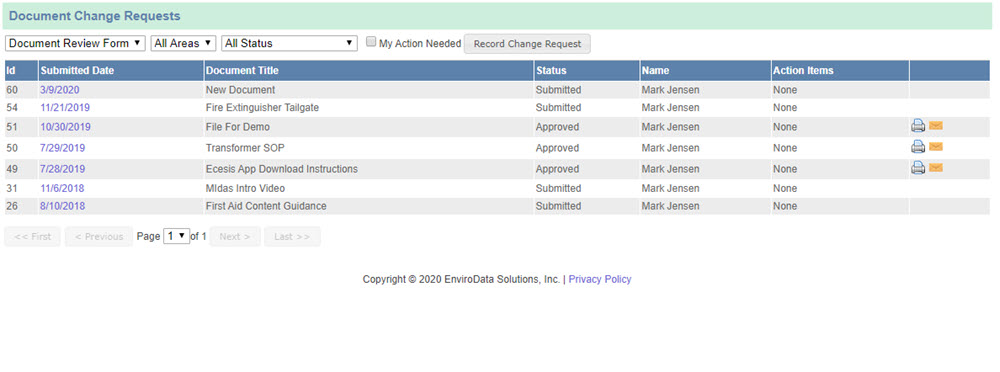
Streamlined Approvals - Document change requests are efficiently submitted and then routed through automated workflows for review and approval.
Standardized Review - Documents are routed through a consistent and company-defined review process.
Customizable Workflows - Easily customize or integrate your company's existing review checklists and workflows, fully integrated with our Management of Change Solution.
Check-in / Check-out - Check documents out so other users know they are undergoing review or revision.
Mobile App - Sync and access documents on the go with our Mobile EHS App, including offline access in remote locations.
AI-Powered Document Features
Writing a new policy or procedure from scratch — or reviewing a long document for gaps — takes time and subject-matter expertise. Ecesis uses AI to help you draft and review documents, so you start from a solid first version and catch issues faster, while your team keeps full editorial control.
AI Document Drafting – Choose a document type and topic (for example, a lockout/tagout procedure or a respiratory protection program) and Ecesis generates a structured first draft using your organization's details. The draft opens as an editable Word document you can revise before saving.
Guided Clarifying Questions – When a draft depends on facility-specific decisions, the AI asks a few short questions first. Anything you mark as "unknown" is clearly flagged in the document so it is easy to find and complete later.
AI Document Review – Review an existing document and choose your output: a structured list of findings and comments, or a redlined Word file with tracked changes you can accept or reject. You can also review a document against a specific requirement or regulation.
Human-in-the-Loop – Nothing is ever saved or changed automatically. Generated drafts are shown for your review before you save them, and AI review results arrive as tracked changes or comments — you decide what to keep.
You Keep Editorial Control – You edit the draft, set the final wording, and approve the document through your normal review workflow. The AI assists; it does not approve or publish documents on your behalf.
Audit Trail for AI-Assisted Documents – Documents created with AI Assist and AI review actions are recorded in the same audit log as manual entries, giving you a defensible record of how a document was produced and reviewed.
Works With Your Existing Workflow – AI drafting and review live inside the Document Management module alongside version control, approvals, and access permissions — the AI augments your platform, it does not replace it.
AI-generated drafts and review suggestions are a starting point, not a substitute for professional judgment, legal review, or your organization's established document requirements. Have questions about how the AI features work? Request a free 30-minute demo.
Frequently Asked Questions About Document Management Software
What is document management software?
Document Management Software (DMS) is a platform designed to store, organize, and manage documents and files. It provides features for content management, secure document storage, version control, access permissions, and retrieval. A Document Management System also provides a mechanism to protect sensitive information.
Can Ecesis Create Documents Using AI?
Yes. The Document Management module includes AI Document Drafting that generates an editable first draft of a policy, procedure, or SOP from a document type and topic you choose. The draft opens as an editable Word document for you to review, edit, and save — nothing is saved automatically. See the AI Features tab for more detail.
Can AI Review My Existing Documents?
Yes. AI Document Review analyzes an existing document and returns either a structured list of findings and comments or a redlined Word file with tracked changes you can accept or reject. You can also review a document against a specific requirement or regulation. See the AI Features tab for more detail.
Is the AI a Replacement for Professional or Legal Document Review?
No. AI-generated drafts and review suggestions are a starting point for a qualified person to review, edit, and approve through your normal workflow. Nothing is applied automatically, and AI-assisted documents and reviews are recorded in the same audit trail as manual changes.
What Are The Benefits of Going Paperless?
- Always know where your electronic documents and digital files are located
- Have confidence you are working with the most current version of a document
- Retrieving documents is faster than digging through file cabinets
- Files are accessible from nearly any location using a computer, phone or tablet
- Save money on paper and printing costs
Are Files Accessible in Remote Locations?
Yes, digital files may be synced with our Document Management App so they may be accessed where there is no internet connection.
Are Document Approval Workflows Customizable?
Yes, our document approval process is fully integrated with our Management of Change Solution, which provides nearly unlimited flexibility.
What Types of Documents Can Be Uploaded and Stored?
Our Document Management software can upload and store many file types, such as PDFs, Word Documents, PowerPoints, Excel spreadsheets, images and text documents.
Can I View Prior Versions of Documents?
Absolutely, with our version control system, historical document versions are securely maintained in the cloud and readily accessible. This provides an audit trail of document changes.
Can Documents Be Checked Out?
Yes, documents may be checked out to let other users know they are undergoing review/revision and/or are part of another document workflow.
Do You Have Small Business Pricing?
Yes, please see our pricing page.
Additional Resources
Why Ecesis
Intuitive and Easy-To-Use - We understand that everyone is not a technology expert and strive to make an easy-to-use document management solution that everyone can use with little to no training.
Customizable and Agile - Our cloud-based document management solution is flexible and highly configurable by the end user. This eliminates the need for you to pay for expensive programming updates.
Subject-Matter Experts - Our solutions are developed and supported by subject-matter experts who have experience implementing and maintaining EHS Software Solutions throughout a variety of industries.

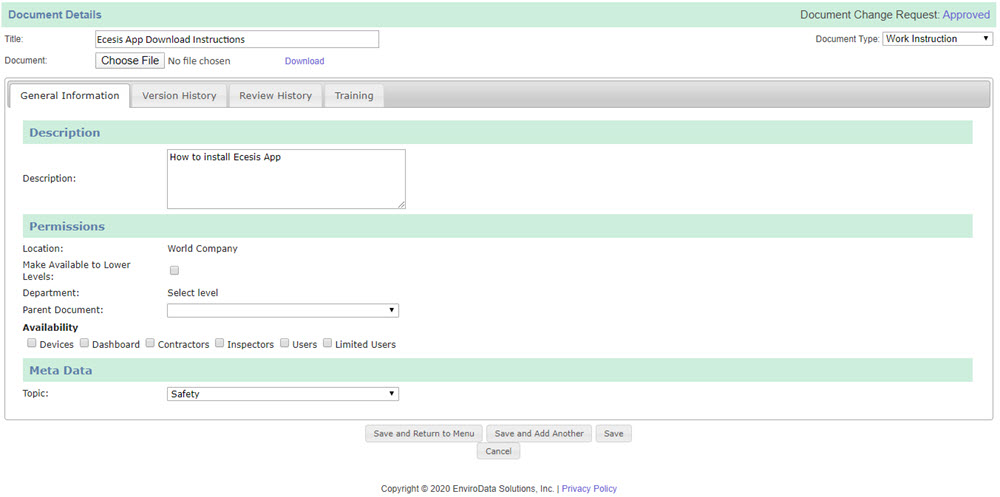
Click Images Below to See Our Solution In Action
Please call us at (720) 547-5102 or complete the form below to learn more about how we can help you store, control, and review your documents.